Payroll in your pocket. Answers at your fingertips.
Your people shouldn't have to wait until they're at a desk to access their pay information.
Give employees and managers instant access to payslips, leave requests, approvals, and workforce insights – anytime, anywhere, from any device.
The Challenge: payroll trapped behind a desktop
The Challenge
- - Employees can't check payslips without a computer
- - Leave requests pile up waiting for manager access
- - Field staff and frontline workers are disconnected
The Impact
- - Employees feel out of the loop about their own pay
- - Managers can't respond quickly to time-sensitive requests
- - Frontline teams feel like second-class citizens
A Better Way
Your people deserve the same instant access to their pay information that they have to everything else in their lives – right from their phone.
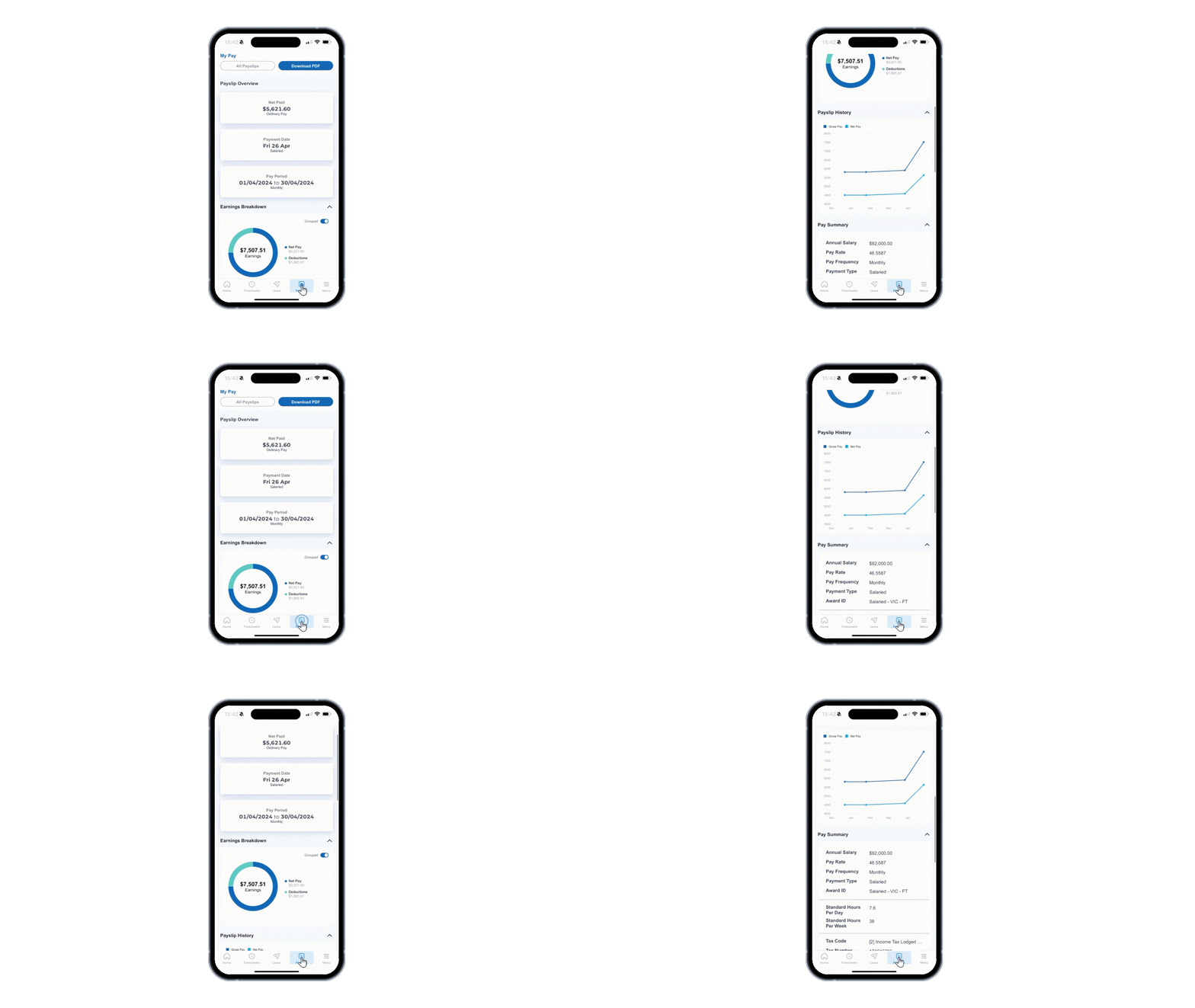
Interactive Payslips: Clear answers, no waiting
Employees can view their payslips instantly with a clear, visual breakdown of earnings, deductions, and leave balances – all optimised for mobile viewing.
- Graphical earnings display with tap-to-expand details
- Complete breakdown of all pay components
- Historical view of gross and net pay trends
- Download payslips as PDF directly to device
Leave Management: Request, approve, done
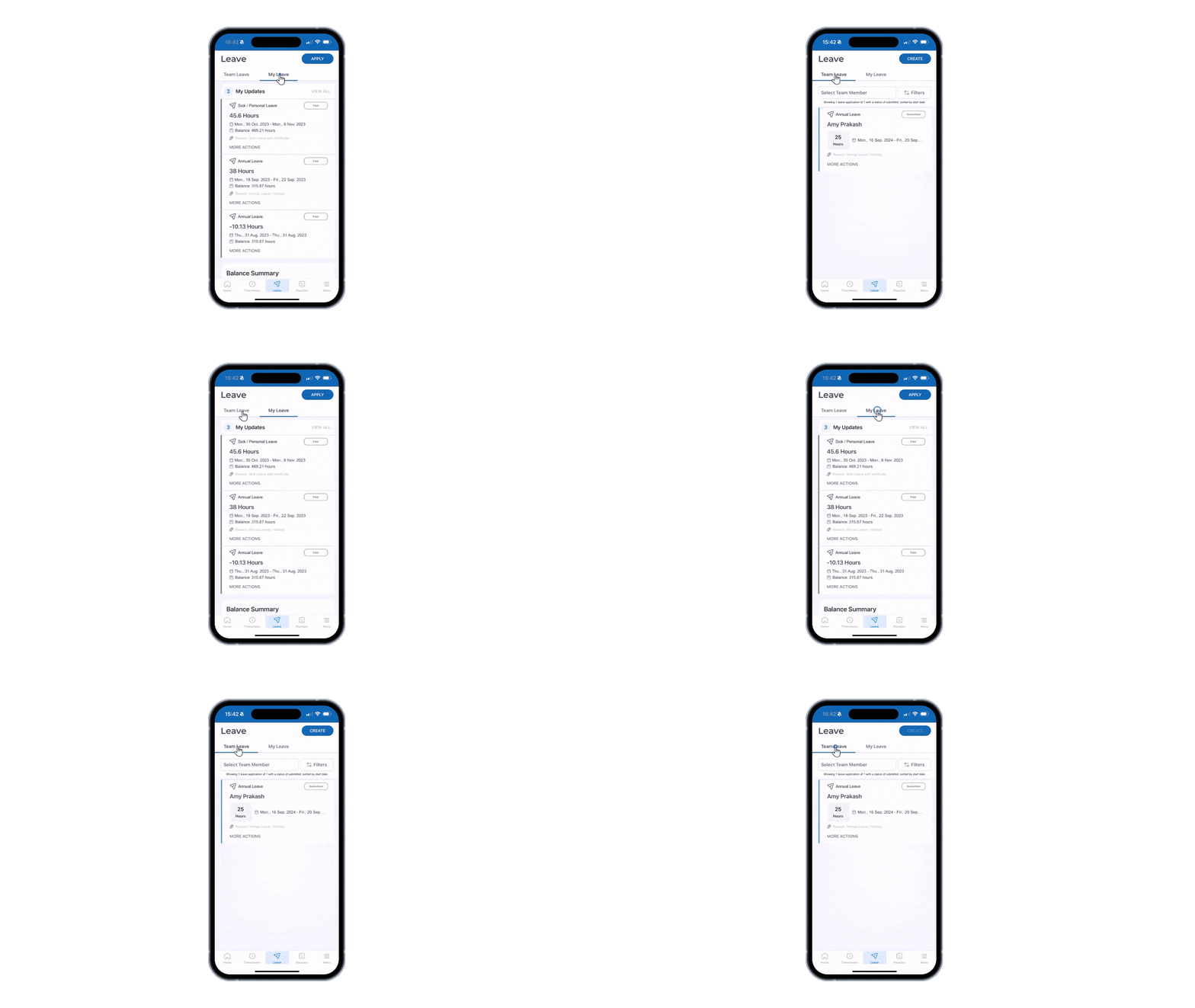
Submit leave requests in seconds. Managers can review team calendars and approve with a single tap – no more delays waiting for desktop access.
- Submit leave requests with a few taps
- View leave balances before requesting
- Managers see team calendar at a glance
- One-tap approvals with optional comments
Manager Approvals: Keep things moving
Leave requests, timesheets, expense claims, form submissions – managers can approve anything from anywhere, keeping workflows moving.
- Unified approval inbox for all request types
- Push notifications for new items requiring action
- Review full details before approving
- Bulk approve multiple items at once
Push Notifications
Never miss an approval
One-Tap Actions
Approve or decline instantly
Real-Time Sync
Changes reflect immediately
Secure Access
Biometric authentication
Workforce Insights: Data on the go
Managers can access key workforce metrics and reports wherever they are – headcount, attendance, leave patterns, and more.
- Team headcount and attendance dashboards
- Leave patterns and coverage visibility
- Overtime and hours worked summaries
- Quick access to team member details
What success looks like
For HR & Payroll
- Fewer payslip-related queries
- Leave requests processed faster
- Happier, more connected workforce
For Managers
- Approve requests from anywhere
- Team visibility at a glance
- Respond faster to time-sensitive needs
For Employees
- Instant access to payslips
- Submit leave in seconds
- Feel connected and informed
What makes the Affinity Mobile App different
Native Mobile Experience
Built for mobile from the ground up – not a responsive website crammed into an app.
Enterprise-Grade Security
Biometric login, encrypted data, and the same security standards as the full platform.
Real-Time Sync
Changes made in the app reflect instantly in the system – no waiting for overnight syncs.
Frequently asked questions
What can employees do in the Affinity mobile app?
Employees can view interactive payslips with a full breakdown of earnings, deductions, and leave balances; submit leave requests and check balances before applying; and receive push notifications about approvals or payroll actions. The app provides the same data as the full self-service portal, optimised for a phone screen.
What can managers do in the Affinity mobile app?
Managers have a unified approval inbox for leave requests, timesheets, and other workforce actions. Push notifications alert them to new items, and they can review full request details and approve or decline from anywhere — without needing desktop access.
Is the Affinity mobile app a native app or a mobile website?
The Affinity mobile app is a native application built for iOS and Android — not a responsive website packaged as an app. It is designed for a mobile-first experience, with tap-to-expand payslip details, gesture-based navigation, and performance optimised for mobile networks.
How secure is the mobile app?
The app supports biometric login (Face ID and fingerprint), uses encrypted data transmission, and applies the same enterprise-grade security standards as the full Affinity platform. Access is controlled by the same role and permission settings configured for each employee or manager.
Which platforms is the Affinity mobile app available on?
The Affinity mobile app is available on both iOS (Apple App Store) and Android (Google Play Store).
Does data in the mobile app stay in sync with the main platform?
Yes. The mobile app connects to the same live platform data as the desktop experience — there are no overnight syncs or delayed updates. A leave request submitted on the app appears immediately in the manager's inbox and flows into payroll in real time.
More questions? See our full FAQ
Ready to stop juggling and start leading?
See how one AU/NZ-built platform can transform daily operations, keep journals clean and give you back time for the work that matters.